Pag-IBIG for Self-Employed Members
Register under the right category, keep one permanent MID number, understand the current contribution treatment, and avoid common payment and record mistakes.
Quick answer
A self-employed Filipino can register or maintain Pag-IBIG membership without a payroll employer. The correct setup depends on the actual work: a professional or business owner, job order worker, service provider, market vendor, transport worker, freelancer, or another earning-group classification.
New members can begin through the official online registration service. Anyone who already has a Pag-IBIG MID number should update the existing record rather than register again. Contributions must then be paid under the correct MID, member category, savings type, amount, and coverage period.
Who is considered self-employed by Pag-IBIG?
The term covers more than registered business owners. The current Member’s Data Form separates several earning situations, and that classification affects how the monthly Regular Savings amount is computed.
Professional or business owner
This may include a licensed professional, consultant, freelancer operating as a business, sole proprietor, partner, online seller, or another person earning from a profession or enterprise rather than from one payroll employer.
Job order or contract-based worker
The current MDF includes job order personnel under the mandatory membership categories. The exact record should reflect the actual arrangement instead of being forced into a regular employee setup.
Other Earning Group
Circular No. 460 lists farmers, fisherfolks, market vendors, transport workers, service providers, family drivers, similar self-employed people, and persons who work occasionally or sporadically.
Voluntary or individual payor
Some people who are not under a mandatory self-employed category may be recorded under an appropriate voluntary classification. Pag-IBIG should confirm the category when the work arrangement does not clearly match the choices on the form.
The membership record should match the real source of income. An incorrect category can create problems when payments, loans, or supporting documents are later reviewed.
Is Pag-IBIG mandatory for self-employed members?
The safest answer is that certain self-employed groups are subject to mandatory coverage, while other individuals may participate through a voluntary or individual-payor classification. Circular No. 460 specifically refers to self-employed persons under mandatory coverage and requires professional or business-owner members in that group to pay both the member share and the employer counterpart.
The same circular identifies Other Earning Groups under mandatory coverage but gives them a different member-share table. The current MDF also displays self-employed classifications under mandatory membership. Because freelance and informal work can overlap, ask Pag-IBIG to confirm the classification when your situation is not clear from the form.
How to register as a self-employed Pag-IBIG member
Start by confirming whether Pag-IBIG already has a record for you. This prevents duplicate registration, which is especially common among people who previously worked for a company.
Check for an existing MID number
Retrieve or verify the old MID if a former employer may have enrolled you. Use the same permanent number even after changing jobs, starting a business, or becoming a freelancer.
Open the official registration service if you are genuinely new
The current service offers registration using National ID details, a National ID QR code, or personal information for an applicant who does not have a National ID.
Prepare the current registration files
The public registration screen instructs applicants to prepare a valid ID, proof of income, and a selfie photo. The exact upload prompts appear after the initial identity details are validated.
Select the membership category accurately
Choose the category that describes the real work or business. The current MDF includes professional or business owner, job order personnel, and Other Earning Group choices under self-employed membership.
Save the RTN and wait for the permanent MID
The Registration Tracking Number is temporary. Once the permanent MID is available, use that number for Regular Savings payments, account creation, loan applications, and future record updates.
Create or access Virtual Pag-IBIG
After the MID and identity information are ready, use Virtual Pag-IBIG to access available online member services and review posted savings records.

Pag-IBIG self-employed requirements
The public requirements are intentionally broad because proof differs among professionals, business owners, freelancers, vendors, drivers, and other earners.
Core preparation
- Accurate personal and contact information
- One valid ID acceptable to Pag-IBIG
- Proof of income or source of earnings
- Selfie photo for the current online personal-information route
- National ID information or QR image when using a National ID route
- Existing MID or RTN, when already issued
The current MDF linked by Pag-IBIG is HQP-PFF-039, Version 12. It instructs applicants to present one valid ID and proof of income, except for the categories specifically exempted on the form.
Pag-IBIG contribution for self-employed members
Circular No. 460 increased the Maximum Fund Salary to ₱10,000 beginning February 2024. The rate has two important self-employed treatments, so a single flat amount does not describe every member.
| Member classification | Fund salary | Current rate treatment | Illustrative monthly amount |
|---|---|---|---|
| Professional or business owner Subject to mandatory self-employed coverage | ₱1,500 or below | 1% member share plus 2% employer counterpart | ₱45 at a ₱1,500 fund salary |
| Professional or business owner | Above ₱1,500 | 2% member share plus 2% employer counterpart | ₱200 at ₱5,000; maximum standard total ₱400 at ₱10,000 or above |
| Other Earning Group | At least ₱1,000 to ₱1,500 | 1% member contribution | ₱10 to ₱15 |
| Other Earning Group | Above ₱1,500 | 2% member contribution | ₱100 at ₱5,000; maximum standard amount ₱200 at the ₱10,000 cap |

It is the maximum standard total for a professional or business owner when the fund salary reaches the ₱10,000 cap. Check the recorded category and fund salary before relying on any online contribution table.
Self-employed contribution calculator
This educational estimator follows the two Circular No. 460 treatments described above. Pag-IBIG’s record and accepted payment setup remain controlling.
The standard computation uses a maximum fund salary of ₱10,000.
This is not an official Pag-IBIG calculator. A voluntary amount, special arrangement, corrected category, or branch instruction may produce a different payment.
How to pay Pag-IBIG as self-employed
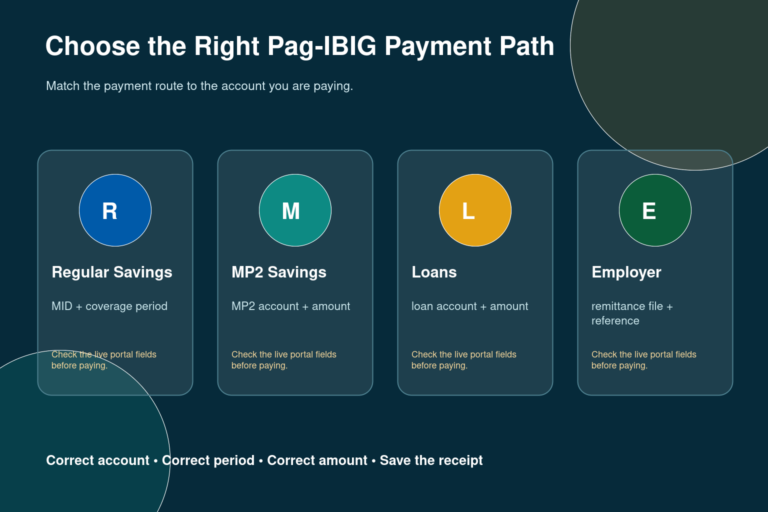
A self-employed member pays without an employer payroll remittance. Eligible individual members can use the online payment services and approved collecting channels currently made available by Pag-IBIG Fund. The payment screen or collecting partner should identify the information required for the selected transaction.
Before paying
- Confirm the permanent MID number.
- Check the member category and contribution amount.
- Select Regular Savings, not MP2 or a loan payment.
- Enter the correct coverage month or quarter.
After paying
- Save the official receipt and transaction reference.
- Check whether the name and MID are correct.
- Review the posted record in Virtual Pag-IBIG.
- Report an unposted or misapplied payment with evidence.
Changing from employed to self-employed
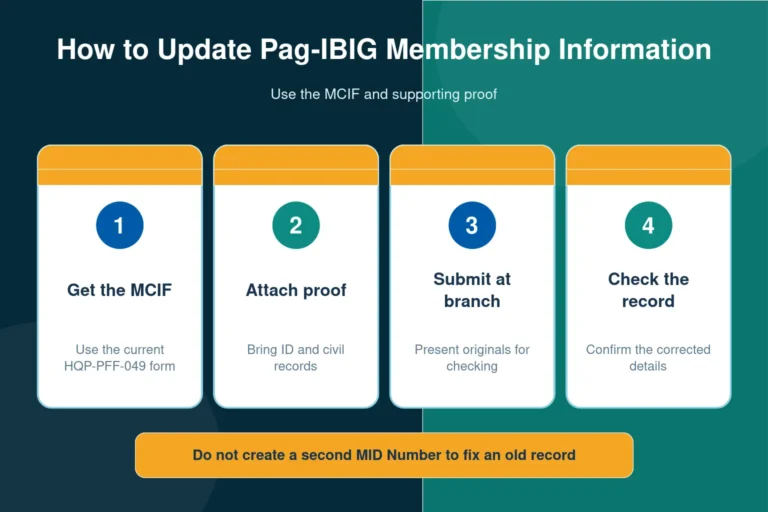
Your old employer’s name may remain in historical records, but the permanent MID number should remain the same. The task is a record update, not a new registration.
Retrieve the existing MID
Use the MID inquiry or member support route when you no longer remember the number.
Prepare the MCIF and supporting records
Follow the current membership-information update process for the work, business, address, contact, or category details that changed.
Confirm the new category
Ask Pag-IBIG to clarify whether the record should show professional or business owner, job order personnel, Other Earning Group, or another classification.
Use the same MID for future payments
Do not open a second record merely because employer deductions stopped. Future self-remitted savings should remain connected to the established membership.

Benefits available to self-employed members
Regular Savings contributions are credited to the member’s provident savings record and may earn the annual dividend declared by Pag-IBIG Fund. Active members may also become eligible for other programs when they meet each product’s contribution, capacity, documentary, and account-status rules.
Regular Savings and claims
Membership savings and declared dividends form part of the member’s provident benefit. Withdrawal or claim is allowed only under the qualifying grounds and current claim process.
MP2 Savings
An eligible member can open a separate MP2 Savings account. MP2 payments do not replace the Regular Savings contribution used for active membership and some eligibility checks.
Short-term loans
A self-employed member may apply for the Multi-Purpose Loan after meeting the current savings, active-membership, capacity-to-pay, and documentary conditions.
Housing finance
Self-employed applicants follow the general housing-loan requirements plus the income records appropriate to their business or profession.
The current MDF includes a disclaimer that membership registration does not automatically qualify a member for Pag-IBIG programs. Every loan or benefit keeps its own eligibility and documentary requirements.
Common problems and how to correct them
| Problem | Likely cause | Correct action |
|---|---|---|
| Two MID numbers appear | A new registration was completed after an earlier employer had already enrolled the member. | Stop creating new records and ask Pag-IBIG to review the duplicate membership. |
| Old employer still appears | The membership information was not updated after leaving payroll employment. | Use the MCIF process and submit the supporting records requested for the new status. |
| Payment is missing | Incorrect MID, savings type, coverage period, or delayed channel posting. | Compare the receipt with the member record and report the transaction with its reference number. |
| Wrong contribution amount | The payer used a generic table without checking the self-employed category. | Confirm whether the record is professional or business owner, OEG, or another classification. |
| Loan application asks for different documents | Membership requirements were confused with loan proof-of-income requirements. | Use the article that owns the specific loan intent and prepare that product’s current checklist. |
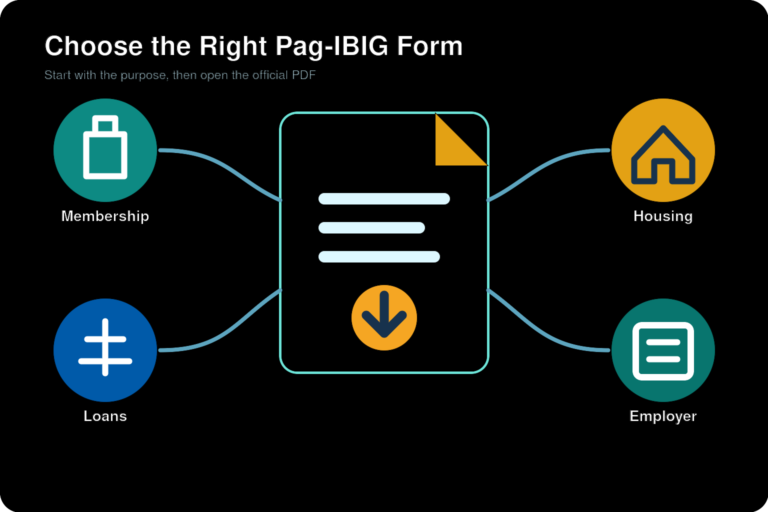
Official resources
Frequently asked questions
Is Pag-IBIG mandatory for self-employed people?
Some self-employed groups are covered as mandatory members under Pag-IBIG rules, including professional or business-owner classifications and specified Other Earning Groups. The correct answer depends on the member category shown in the current MDF and the Fund's classification of the work. A person who does not fall under mandatory coverage may still be accepted under an appropriate voluntary or individual-payor category.
How do I register with Pag-IBIG as self-employed?
First check whether you already have a Pag-IBIG MID number. A new member can use the official online membership registration service, while an existing member should update the old record instead of registering again. Prepare the identity, income, contact, and selfie files requested by the current registration route.
What are the Pag-IBIG requirements for self-employed members?
The current Member's Data Form instructs applicants to present one valid ID and proof of income. The online route also tells applicants to prepare a valid ID, proof of income, and a selfie photo. Pag-IBIG may request additional supporting records when the declared work, business, or income cannot be verified.
Can I register as self-employed online?
A new member can begin through Pag-IBIG Fund's official online membership registration service. The service currently offers registration using National ID information, a National ID QR code, or personal information for applicants without a National ID. Existing members who need to change their category should follow the record-update process instead.
How much is the Pag-IBIG contribution for a self-employed professional?
A self-employed professional or business owner subject to mandatory coverage is treated as both the employee and employer under Circular No. 460. The standard total is 3 percent of fund salary at ₱1,500 or below and 4 percent above ₱1,500, subject to the ₱10,000 Maximum Fund Salary. This produces a maximum standard total of ₱400 per month.
Do all self-employed members pay ₱400 monthly?
No. ₱400 is the maximum standard total when a professional or business owner's fund salary reaches the ₱10,000 cap. A lower declared fund salary may produce a lower computation, and an Other Earning Group member follows a different member-share schedule. Confirm the category before making payments.
What is an Other Earning Group in Pag-IBIG?
Circular No. 460 lists examples such as farmers, fisherfolks, market vendors, transport workers, similar self-employed individuals, service providers, family drivers, and people who perform work occasionally or sporadically. Their contribution table is different from the both-shares treatment used for professional or business-owner self-employed members.
Can a freelancer register as self-employed?
A freelancer may fit a professional, business-owner, service-provider, or Other Earning Group classification depending on the actual work arrangement. Use the category that accurately describes how the income is earned. Pag-IBIG should confirm the final classification when the situation is unclear.
How do I change Pag-IBIG from employed to self-employed?
Keep the same MID number. Update the existing membership information through the current Member's Change of Information process and provide the supporting records requested for the new work or business details. Do not create a second membership record.
Will my Pag-IBIG MID number change when I become self-employed?
No new MID should be created merely because the member changed jobs or became self-employed. The permanent MID remains connected to the same member. Update the record and use the same number for future Regular Savings payments.
How can a self-employed member pay Pag-IBIG contributions?
Individual members can use payment options made available by Pag-IBIG Fund, including eligible online services through Virtual Pag-IBIG and approved collecting channels. Enter the correct MID number, savings type, coverage period, and amount. Keep the receipt until the payment appears in the member record.
Can I pay Pag-IBIG monthly or quarterly?
The current MDF includes monthly and quarterly frequency choices when membership savings are not paid through payroll deduction. Follow the schedule accepted for the account and enter the correct coverage months. When changing frequency or paying past periods, confirm the proper setup with Pag-IBIG.
Can self-employed members apply for a Pag-IBIG loan?
Yes, but registration alone does not create automatic loan eligibility. The member must satisfy the savings, active-membership, capacity-to-pay, documentary, and product-specific requirements. Use the separate MPL or housing-loan page for the full requirements of that loan.
Can a self-employed member open MP2 Savings?
An eligible active Pag-IBIG member with a permanent MID number may generally enroll in MP2, subject to the current program rules. MP2 is separate from Regular Savings and has its own enrollment, payment, maturity, and withdrawal rules.
What proof of income is accepted for self-employed registration?
The official MDF and online registration service require proof of income but do not present one universal document list for every occupation on the public entry screen. Prepare a current record that supports the declared business, profession, service, or income, and confirm the accepted document with Pag-IBIG when the route or branch does not specify it.
What should I do if my self-employed payment is not posted?
Check the MID number, savings type, coverage period, amount, and transaction reference on the receipt. Allow for the posting process shown by the payment channel, then compare the record in Virtual Pag-IBIG. Contact Pag-IBIG with the receipt when the payment remains missing or was applied to the wrong period.
This website is an independent, unofficial informational resource and is not operated by Pag-IBIG Fund or any Philippine government agency. Public forms, portals, classifications, and contribution rules can be revised. Use the official Pag-IBIG services for transactions and confirm account-specific instructions directly with the Fund.