Pag-IBIG Membership for OFWs
Register through the current online service, keep one permanent MID Number, pay savings under the correct member record, and use Virtual Pag-IBIG while working overseas.
Quick answer
Filipinos employed by foreign-based employers are included in mandatory Pag-IBIG coverage under Republic Act No. 9679. A first-time member can use the official online membership registration service, choose the National ID or no-National-ID route, and prepare a valid ID, proof of income, and a clear selfie as requested by the current portal.
An OFW who already has a Pag-IBIG MID Number should not register again. Continue using the same permanent number, update outdated member information when necessary, and create Virtual Pag-IBIG access for available online records and payment services.
Who needs Pag-IBIG membership as an OFW?
Pag-IBIG membership is not limited to workers employed inside the Philippines. The Home Development Mutual Fund Law includes Filipinos employed by foreign-based employers among those covered by the Fund. This can include land-based and sea-based workers whose employment is outside the country.
Coverage and registration are different from eligibility for a particular loan or withdrawal. Registration creates or confirms the member record. Contributions, loan qualifications, claims, and special assistance programs have their own rules.
First-time member
Use the official online registration service and save the RTN issued after a successful submission.
Existing member abroad
Continue with the same MID Number and update the employment or contact information attached to it.
Returning Filipino worker
Do not create a new record after returning home. The same MID should continue to connect your savings and transactions.
OFW membership is different from an OFW housing loan
This article owns the registration, member record, contribution, and online-access intent. Housing-loan income documents, property papers, loan limits, and application requirements belong to a separate page.

Pag-IBIG membership requirements for OFWs
The current online registration route tells applicants to prepare a valid ID, proof of income, and a selfie. Exact fields or accepted files can change, so read the live portal instructions before uploading.

| Item | Why it is needed | Practical check |
|---|---|---|
| Valid ID | Confirms the applicant’s identity | Use a clear, unexpired document and enter the name exactly as shown. |
| Proof of income or overseas work | Supports the work or earning information entered during registration | Prepare a current employment contract, employer certification, payslip, or another file accepted by the portal. |
| Clear selfie | Supports online identity verification | Use good lighting, a plain view of your face, and the file format or size shown by the portal. |
| Accurate personal details | Helps Pag-IBIG match or create the correct member record | Check the birth date, civil status, mother’s maiden name, and spelling before submitting. |
| Own email and mobile number | Used for notices, verification, and future account access | Avoid using an agency employee’s or another person’s permanent contact details. |
| National ID or alternative route | Determines which online registration path you use | The current landing page provides a route for applicants who do not have a National ID. |
How to apply for Pag-IBIG membership as an OFW
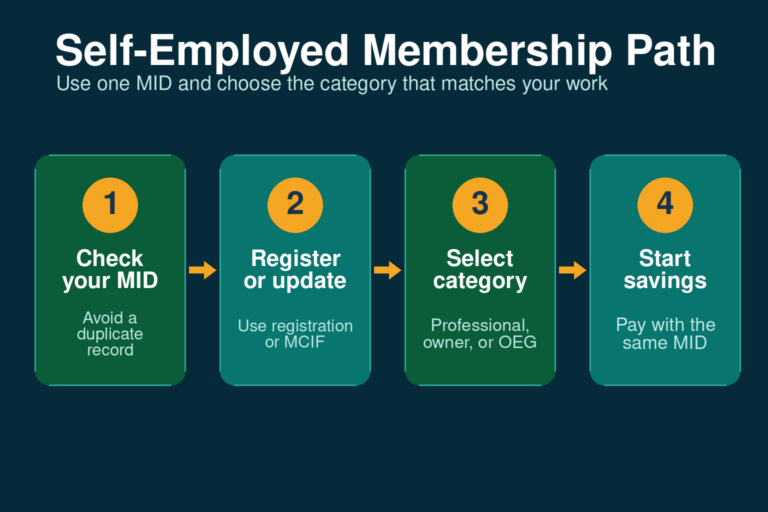
Check whether you already have a MID Number
Search old payslips, Pag-IBIG documents, employer records, or the official MID inquiry. A former local employee may already have a permanent membership record.
Open the official membership registration service
Start from Virtual Pag-IBIG’s Be a Member page or the official Online Membership Registration portal. Do not use a form hosted by an unknown third-party website.
Choose the correct identity route
Select the National ID route when you can complete that verification. Use the separate no-National-ID option when appropriate and follow the fields displayed by the portal.
Enter identity and OFW work information accurately
Use the same legal name, birth details, and work information shown by your supporting documents. Choose the membership or work category that truthfully describes your situation.
Upload the requested documents
Attach the valid ID, proof of income, selfie, or other file requested on your selected route. Check that every page is readable before continuing.
Review the consent and submission details
Read the terms and privacy notice, then check the spelling, dates, email, mobile number, and employment details one more time.
Save the Registration Tracking Number
Take a screenshot and write the RTN in a secure place. The RTN is temporary and should not be confused with the permanent MID Number.
Retrieve the MID and create online access
Use the official MID inquiry after the registration has been processed. Then create or access Virtual Pag-IBIG using the permanent member record.

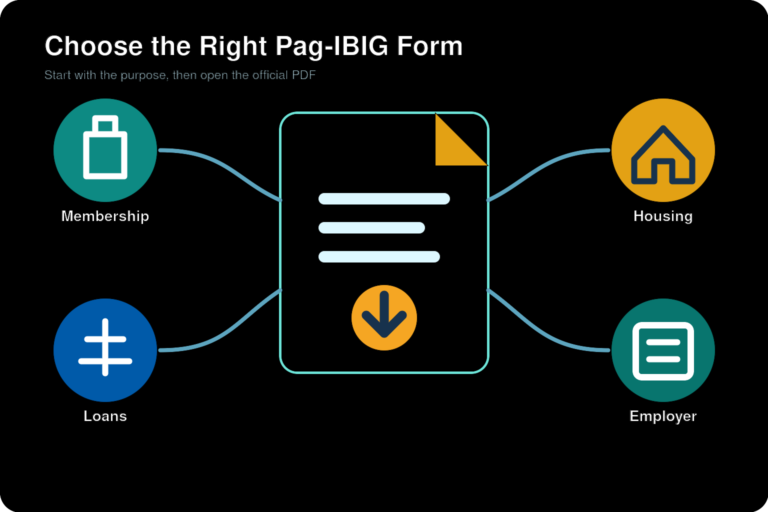
Pag-IBIG form for an OFW member
The online registration system collects the information needed to create the membership record. Pag-IBIG’s Member’s Data Form also contains an OFW category and work-related fields, but an online applicant should follow the current portal rather than downloading an old form from a third-party website.
Use the latest official MDF only when Pag-IBIG instructs you to submit a form. Our Member’s Data Form explanation covers what the MDF contains, while the Pag-IBIG downloadable forms page points to current official form sources.
Already registered before working overseas?
A change from local employment to overseas work does not create a new person or a new Pag-IBIG membership. Continue using the MID Number from your earlier employment. Give that number whenever an official payment channel, employer process, or Pag-IBIG transaction asks for the member identifier.
Update information when your overseas employer, occupation, address, mobile number, email, civil status, or other member detail is outdated. Use the official change process and supporting documents instead of submitting another membership registration.
How to search or check OFW membership
Track a new registration
Use the RTN saved after submission while the permanent member number is not yet available.
Retrieve the permanent number
Use the official inquiry and our MID Number instructions when you forgot or never recorded it.
Review available online records
Create or access Virtual Pag-IBIG to use the records and services currently available to your account.
Online inquiries can fail when a name, birth date, or contact detail does not match the registered record. Try the original registration information and use official support when the system cannot find a match. Do not create a second account or second registration as a shortcut.
OFW contributions and payment from abroad
Pag-IBIG membership savings are not an enrollment charge. They build the member’s Regular Savings record and can affect eligibility for programs that require a contribution history. The exact amount, coverage period, and payment arrangement should be confirmed for the member category shown in the current Pag-IBIG system.
Use an official payment option
Virtual Pag-IBIG provides online payment services. Other collecting partners may be available, but channel lists can change, so confirm the payee and reference instructions before sending money.
Keep the payment record
Check the MID Number, amount, and coverage period. Save the receipt, instruction number, and transaction date until the payment appears in the member record.
Using Virtual Pag-IBIG while overseas
Virtual Pag-IBIG can reduce the need for a branch visit by providing access to services that are available for the member’s verified record. Current public menus include viewing records, selected online payments, and other membership or loan services.
- Use your own email address and mobile number
- Keep the permanent MID Number available
- Enter information exactly as registered
- Protect one-time passwords and recovery codes
- Check savings after making a payment
- Save receipts and official reference numbers
- Update outdated contact details properly
- Use official URLs rather than links sent by strangers
Account access is not the same as correcting the underlying membership record. A login email or password issue belongs to the online account, while a wrong name, birth date, civil status, or employment detail may require the formal member-information update process.
Does an OFW apply through POEA or DMW?
Pag-IBIG membership registration is completed through Pag-IBIG Fund’s official registration service. The former Philippine Overseas Employment Administration is now part of the Department of Migrant Workers structure, but a DMW, agency, or deployment requirement is a separate employment process.
An agency may ask you for a MID Number, registration proof, or contribution record. That request does not create a different “POEA Pag-IBIG membership” and does not justify paying an unofficial fixer. Register with Pag-IBIG, keep the RTN and MID, and verify any deployment-document requirement with the responsible labor or recruitment authority.
What an OFW can use membership for
Regular Savings
Your contributions and declared dividends form part of the member’s provident savings, subject to Pag-IBIG rules.
Voluntary MP2 Savings
An eligible member may open MP2 using the same MID Number. See the MP2 Savings article for program details.
Loan applications
Membership is the starting point, but every loan has separate savings, capacity, documentary, and account-status requirements.
Common OFW membership problems
| Problem | Likely cause | What to do |
|---|---|---|
| The portal cannot match the applicant | Name or birth details differ from the ID or an old Pag-IBIG record | Check the original spelling and retrieve the existing MID before trying another registration. |
| No MID Number appears yet | The applicant only has an RTN or the submission still needs processing | Keep the RTN and use the official MID inquiry later. Ask support when the delay is unusual. |
| Payment is not visible | Wrong MID, wrong coverage period, or transaction still needs verification | Keep the receipt and ask Pag-IBIG to trace the payment. Do not immediately pay the same period twice. |
| Two MID Numbers exist | A second registration was created after a forgotten or outdated record | Request official consolidation or merging of the membership records. |
| Virtual Pag-IBIG cannot be activated | Contact or identity details do not match the member record | Use the correct verification route or update the underlying membership information. |
| An agency asks for money to register | The person is offering an unofficial service or mixing registration with another process | Use the official portal and verify separate recruitment or documentation charges with the proper authority. |
Frequently asked questions
Is Pag-IBIG membership required for OFWs?
Republic Act No. 9679 includes Filipinos employed by foreign-based employers in mandatory Pag-IBIG coverage. Your exact registration and contribution arrangement may depend on your work record, so use the official membership portal or ask Pag-IBIG when your situation is unusual.
How can an OFW apply for Pag-IBIG membership?
Use Pag-IBIG Fund's official online membership registration service. Choose the National ID route or the option for applicants without a National ID, complete the required identity and work details, upload the requested files, and save the Registration Tracking Number issued after submission.
What are the Pag-IBIG membership requirements for an OFW?
The current online route asks applicants to prepare a valid ID, proof of income, and a clear selfie. You also need accurate personal details and contact information. The portal may request additional information according to the registration route you select.
Can I register without a National ID?
Yes. The current registration landing page provides a separate option for applicants who do not have a National ID. Follow the fields and upload instructions shown on that route.
What proof of income can an OFW use?
Use a current document that reliably shows your overseas work or source of income, such as an employment contract, employer certification, payslip, or another document accepted by the registration portal. The exact accepted file should be confirmed on the live portal before submission.
Is there a Pag-IBIG membership fee for OFWs?
The official online membership page does not list a separate application or registration fee. Monthly membership savings are different from a registration fee. Confirm the current contribution amount and payment instructions for your category through Pag-IBIG Fund.
What is the Pag-IBIG membership form for OFWs?
Online applicants complete the membership registration fields in the official portal. The Member's Data Form is the general membership form used for member information, including an OFW category. Use the current official form only when Pag-IBIG instructs you to submit it.
What is an RTN?
The Registration Tracking Number is the reference produced for a submitted membership registration. Keep it until Pag-IBIG issues or confirms the permanent Membership ID Number.
How do I search for my Pag-IBIG membership as an OFW?
Use the official MID inquiry when you have completed registration and need to retrieve or verify the permanent number. You can also review records through Virtual Pag-IBIG after creating an account. Do not register again simply because you forgot the number.
Does an OFW get a different MID Number?
No. A member should keep one permanent MID Number even after moving abroad, changing employers, returning to the Philippines, or changing membership category.
I was already a Pag-IBIG member before becoming an OFW. Should I register again?
No. Continue using the existing MID Number. Update outdated employment, address, email, mobile, or membership information through the proper change process instead of creating a duplicate record.
Can I create Virtual Pag-IBIG access while abroad?
Yes. The official portal provides online account services, although the available verification route can depend on the information and documents connected to your membership record. Keep your own email address and mobile number available.
How can an OFW pay Pag-IBIG contributions?
Use the payment options currently displayed by Virtual Pag-IBIG or another collecting channel officially recognized by Pag-IBIG Fund. Enter the correct MID Number and coverage period, then keep the payment reference and receipt.
Does Pag-IBIG membership automatically qualify an OFW for a housing loan?
No. Membership registration creates the member record, but housing-loan eligibility has separate savings, income, age, credit, property, and documentary requirements. Review the dedicated OFW housing-loan page before applying.
Can an OFW open an MP2 account?
An eligible member with a valid Pag-IBIG record may enroll in MP2 subject to the current program rules. Complete basic membership first and use the same MID Number for both Regular Savings and MP2.
Do I apply through POEA or DMW for Pag-IBIG membership?
Pag-IBIG membership registration is completed through Pag-IBIG Fund's official service. A recruitment agency or the Department of Migrant Workers may request Pag-IBIG information for a separate employment or deployment process, but that does not replace the Pag-IBIG registration portal.
What should I do when my OFW registration details are wrong?
Do not submit a second registration. Use the official member-information update process and provide the supporting documents for the correction. Ask Pag-IBIG for record consolidation when two MID Numbers already exist.
Related Pag-IBIG information
Official resources
Online Membership Registration
Use the live Pag-IBIG registration service and follow the current National ID or no-National-ID route.
Virtual Pag-IBIG Membership
Use the official Be a Member page for registration and MID inquiry access.
Republic Act No. 9679
Read the legal coverage provision that includes Filipinos employed by foreign-based employers.
Account-specific help
Use official Pag-IBIG support when a registration, MID, payment, or account record cannot be resolved online.
Independent information notice
This website is an independent informational resource and is not operated by, affiliated with, or endorsed by Pag-IBIG Fund, the Department of Migrant Workers, or any Philippine government agency. Registration fields, accepted documents, contribution instructions, payment channels, and online verification methods can change. Confirm account-specific or time-sensitive requirements through official Pag-IBIG channels.