Pag-IBIG Housing Loan Payment Verification
Check whether your monthly amortization was posted, review recorded payments, and understand what to do when a payment is missing from the official account record.
Quick answer
Open Pag-IBIG Fund’s official Online Services page and select Housing Loan Payment Verification, or use the official Payment Viewer directly. Enter your Housing Loan Account Number, last name, first name, and the CAPTCHA, then submit the request.
Pag-IBIG describes the service as a facility for existing housing loan borrowers to view payments and check the reported housing loan balance. It also offers enrollment in electronic Monthly Billing Statements. The viewer is separate from the Virtual Pag-IBIG account login.
Is the housing loan payment verification service still available?
Yes. As of July 31, 2026, the service is still listed under Pag-IBIG Housing Loan on the official Pag-IBIG Online Services page. Searches such as “payment verification gone” or “payment verification removed” may come from an old bookmark, a changed menu location, a temporary page problem, or confusion between the dedicated viewer and Virtual Pag-IBIG.
Dedicated Payment Viewer
This public verification page requests the Housing Loan Account Number, the borrower’s last name and first name, and a CAPTCHA. It is intended for an existing housing loan record.
Virtual Pag-IBIG payment facility
The separate Pay Online facility requires a Virtual Pag-IBIG login to access savings and loan records. Use it for payment functions, not as a substitute for understanding what has already posted.
How to verify a Pag-IBIG housing loan payment online
The verification form is short, but the details must match Pag-IBIG’s housing loan record. Prepare the account number before opening the viewer so you do not confuse it with your MID number, application reference, property account, or payment reference.
Open the official viewer
Start from Pag-IBIG Online Services or open the official Housing Loan Payment Viewer. Check that the domain belongs to Pag-IBIG Fund services before entering account information.
Enter the Housing Loan Account Number
Use the account number shown on the monthly billing statement, loan documents, official receipt, or another Pag-IBIG housing loan record. The viewer does not ask for the MID number in this field.
Enter the borrower’s last name and first name
Match the spelling and name used in the housing loan account. A married-name change, suffix, spacing difference, or use of the co-borrower’s name can prevent a match.
Complete the CAPTCHA
Enter the code shown in the image. Generate a new image when characters are unclear, and avoid copying the code from an old session after the page has refreshed.
Submit and review the record
Compare the payment date, amount, and account record with your receipt or transaction confirmation. Save a dated screenshot for your notes, but keep the original transaction evidence as well.

Information to prepare before checking
You normally need only a few details to open the viewer, but a proper payment check requires more than filling out the form. Keep the transaction evidence beside you so you can identify whether the correct amount was credited to the correct housing loan account and billing period.
- Housing Loan Account Number
- Borrower’s exact first and last name
- Payment date and exact amount
- Transaction or receipt reference number
- Payment channel used
- Billing month or amortization period
- Employer deduction record when applicable
- Latest monthly billing statement
Housing Loan Account Number versus MID number
The Housing Loan Account Number identifies the specific housing loan account. The Pag-IBIG MID number identifies the member. They are not interchangeable, so entering the MID number in the viewer’s loan-account field may result in an error or no record.
If you need help locating your member number, use the separate Pag-IBIG MID number instructions. If the housing loan account number is missing, check the loan documents and billing statement or contact Pag-IBIG through an official channel.

What the viewer can confirm and what it cannot
| Question | Best official service | What it tells you |
|---|---|---|
| Was my monthly amortization posted? | Housing Loan Payment Verification | Review recorded housing loan payments and compare them with your receipt. |
| What balance is currently reported? | Housing Loan Payment Verification or account record | The service description includes checking the housing loan balance. A future balance-inquiry article will cover this intent in depth. |
| How can I pay online? | Virtual Pag-IBIG Pay Online | The payment facility accepts housing loan payments after the required login and consent steps. |
| What is my estimated monthly amortization? | Housing loan calculator | An estimate based on principal, interest rate and term, not proof of an actual posting. |
| What happened to my pending application? | Housing loan application follow-up | Application status is separate from payment verification for an existing loan. |
How to compare a payment with the account record
Do not check only whether a transaction appears. Match the account, date, amount, billing period and reference so that a payment posted under a different period or account is not mistaken for the payment you are investigating.
Match the amount
Compare the exact amount on the receipt with the amount reflected in the viewer. Consider whether the payment included more than one month, penalties, insurance, fees, or another charge.
Match the payment date
The date you initiated a payment may differ from its posting date. Keep both dates and check the settlement information supplied by the payment channel.
Match the billing period
A payment may be applied to an older unpaid period or another amount due. Review the latest billing statement instead of assuming that the newest payment automatically covers the current month.
Match the account
Confirm that the Housing Loan Account Number on the receipt or payment instruction is the same number used in the viewer. This is especially important when a borrower has more than one Pag-IBIG transaction.
What to do when a housing loan payment is not posted
A missing online posting does not automatically prove that the payment was lost. Payment channels can have different settlement processes, and an employer deduction may occur before the employer remits the funds. The verification page itself does not publish one universal posting time for every channel.
Read the payment confirmation
Check whether the receipt, bank, e-wallet, payment center, or employer states a settlement or posting period. Do not use an unofficial estimate when the channel has given a specific timeframe.
Recheck the account details
Confirm the Housing Loan Account Number, borrower name, amount, payment date and billing period. A typographical error can send the investigation toward the wrong account.
Collect complete evidence
Prepare the original receipt, transaction reference, bank or e-wallet statement, payroll deduction, employer remittance information, and screenshots before and after the discrepancy.
Contact the payment channel when necessary
Ask whether the transaction was successful, reversed, pending, rejected, or sent with the account details shown on your receipt. Obtain a written reference for the inquiry.
Report the missing posting to Pag-IBIG
Use official Pag-IBIG contact channels or visit a branch with the evidence. Explain the exact loan account, amount, date, payment channel, reference number and billing period involved.

Special cases that need extra evidence
Employer or payroll deduction
A payslip shows that an amount was deducted from salary. It does not by itself show when the employer remitted the amount or which loan account received it. Request the remittance date, payment reference and employer record when the posting is missing.
GCash, Maya or another e-wallet
Save the successful transaction screen, reference number, timestamp and funding source. Check whether the payment was reversed or refunded before reporting that it has not appeared in Pag-IBIG’s record.
Bank or payment center
Keep the validated slip or official receipt. Ask the bank or center to confirm the biller, account number, amount, date and transaction result if the account record remains unchanged.
Final payment or account closure
Confirm the last posting and check for any remaining amount. Formal account closure and title-release requirements use separate official processes, so do not rely only on a zero-looking screen.
Due date, amount due and electronic billing statements
The keyword “payment verification due date amount” often combines two tasks: confirming a past payment and finding the next amount due. Pag-IBIG’s official service description says borrowers may enroll in the electronic Monthly Billing Statement facility to receive billing statements by email.
Use the latest official billing statement or account notice for the due date and amount due. Do not rely on an old screenshot, a calculator estimate, or a previous month’s amortization because penalties, insurance, adjustments, repricing, or account changes may affect the current amount.
Payment history is not an affordability estimate
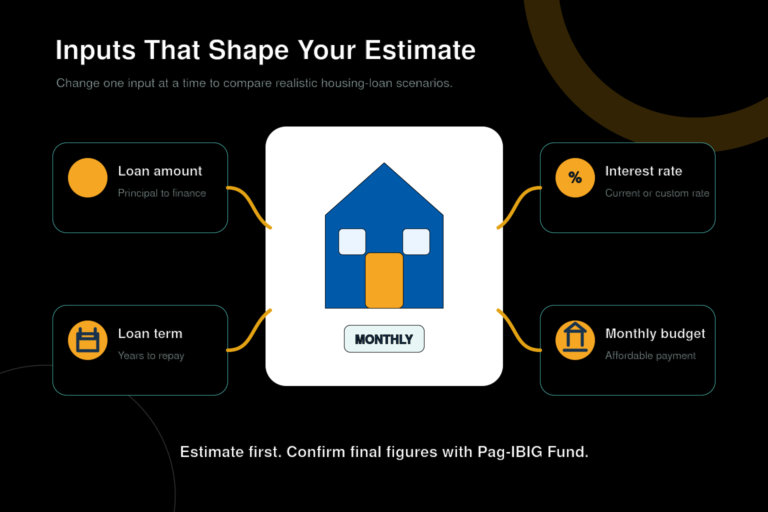
The payment viewer reflects the existing loan account. The Pag-IBIG housing loan calculator estimates a payment for planning, while the housing loan interest rate article explains fixed periods and repricing. Use official billing records for the amount actually due on an active account.
Common payment verification problems
| Problem | Likely check | Practical action |
|---|---|---|
| No record found | Wrong account number or borrower name | Compare the entries with an official billing statement or loan document. |
| CAPTCHA keeps failing | Expired or unclear image | Generate a new image, refresh the page, and type the new code carefully. |
| Old bookmark does not open | Changed route or temporary issue | Start again from the official Pag-IBIG Online Services page. |
| Latest payment is absent | Channel settlement, incorrect details, or reconciliation issue | Check the channel timing, collect evidence, and contact official support after the stated period. |
| Balance differs from expectation | Interest, insurance, penalties, allocation, or prior unpaid amount | Compare the latest billing statement and request an official account explanation when needed. |
| Payroll deduction is missing | Deducted but not yet remitted or posted | Ask the employer for the remittance date and reference, then reconcile with Pag-IBIG. |
Security reminders
- Use an official Pag-IBIG domain
- Do not publish your full account number
- Keep receipts out of public social posts
- Hide QR codes and reference numbers
- Do not pay a person offering account correction
- Use official support for record changes
- Log out of shared devices
- Keep dated copies of important records
Payment verification pages contain sensitive financial information. A scammer can use a loan account number, borrower name, billing statement, receipt, or payment reference to create a convincing message. Share only the minimum information through verified Pag-IBIG channels.
Official resources
Frequently asked questions
Can I verify a Pag-IBIG housing loan payment without a Virtual Pag-IBIG account?
Yes. The dedicated Housing Loan Payment Viewer currently asks for the housing loan account number, the borrower’s last name and first name, and a CAPTCHA. It is separate from the Virtual Pag-IBIG account login.
What number should I enter in the payment viewer?
Enter the Housing Loan Account Number shown on your official housing loan records. Do not substitute your Pag-IBIG MID number unless an official Pag-IBIG page specifically asks for it.
Where can I find my Housing Loan Account Number?
Check your monthly billing statement, housing loan documents, official payment receipt, or account notice. Contact Pag-IBIG through an official channel when the number is missing or unclear.
What information can the Housing Loan Payment Viewer show?
Pag-IBIG describes the service as a way for existing housing loan borrowers to view payments and check the reported housing loan balance. Borrowers may also enroll in the electronic Monthly Billing Statement facility.
Was Pag-IBIG housing loan payment verification removed?
No. As of July 31, 2026, Housing Loan Payment Verification is still listed on the official Pag-IBIG Online Services page. Use that page to open the current official viewer if an old bookmark or menu link no longer works.
Why does the payment viewer reject my name?
Enter the first name and last name exactly as they appear in the housing loan record. Check spelling, spaces, married-name changes, suffixes, and whether the account is under a co-borrower or principal borrower.
What should I do when the CAPTCHA does not work?
Generate a new image, type the characters carefully, refresh the page, or try another updated browser. Avoid repeated rapid submissions because the security control is intended to block automated requests.
How long does a housing loan payment take to appear?
The payment viewer does not publish one universal posting time for every payment channel. Follow the settlement or posting period stated by the bank, e-wallet, payment center, employer, or receipt, then check again after that period has passed.
What should I do if a payment is not posted?
Confirm the housing loan account number and payment details, preserve the receipt and reference number, check the channel’s stated settlement period, and report the missing posting through an official Pag-IBIG support channel if it remains absent.
How do I verify a GCash or e-wallet housing loan payment?
Keep the successful transaction screen and reference number, then use the official Housing Loan Payment Viewer to check whether the amount was posted. The e-wallet confirmation proves the transaction was initiated, while the Pag-IBIG record confirms posting to the loan account.
What if my employer deducted the amortization but it is not reflected?
Keep the payslip showing the deduction and ask the employer for the remittance date, payment reference, and remittance record. A payroll deduction and a posted loan payment are different events, so both records may be needed for reconciliation.
Can the viewer show my due date and amount due?
The service can show payment and balance information, and borrowers may enroll for electronic monthly billing statements. Use the latest official billing statement for the due date and amount due because the details available on screen may change.
Is payment verification the same as checking a housing loan application status?
No. Payment verification is for an existing housing loan account and its posted payments. Application status concerns a pending housing loan application and uses a different official service or follow-up process.
Is payment verification the same as the housing loan calculator?
No. A calculator estimates possible amortization before or during planning. Payment verification checks actual transactions recorded against an existing housing loan account.
Is a screenshot of the viewer enough as official proof?
A screenshot is useful for documenting what appeared on a certain date, but keep the original receipt, transaction reference, bank or e-wallet statement, payroll record, and any written response from Pag-IBIG.
Can another person check my housing loan payments for me?
The viewer uses personal account details, so access should be handled by the borrower or a properly authorized representative. Do not post the full account number, name, receipts, or billing statements on social media or public forums.
What should I verify after making the final housing loan payment?
Confirm that the final amount is posted and that no remaining balance or charge appears. For account closure, title release, or documentary confirmation, follow the separate official Pag-IBIG process rather than relying only on the viewer.
Related Housing Loan Resources
Independent information notice
This website is an independent informational resource and is not Pag-IBIG Fund or a Philippine government website. Online services, account fields, payment records and support procedures can change. Use official Pag-IBIG channels for account-specific confirmation, missing-payment reconciliation, formal statements, account closure and title-release instructions.
Members who have not paid yet can review the correct account, channel, fee, and receipt process in our Pag-IBIG online payment instructions.