Pag-IBIG Downloadable Forms: Official PDF Links and Form List
Use this page to open the most commonly requested Pag-IBIG forms for membership, record updates, loans, claims, housing, Loyalty Card Plus, MP2, and employer transactions.
Each download button below points to a Pag-IBIG Fund PDF. Check the form code and revision date printed on the document before completing it.
Quick answer
Pag-IBIG downloadable forms are available as official PDFs on the Pag-IBIG Fund website. The form you need depends on the transaction, not only on the keyword you searched. For example, the blank Member’s Data Form is used for membership information, the MCIF is used for changes to member data, the MPLAF is used for a Multi-Purpose Loan, and the HLA is used for a housing loan application.
Do not download a random copy from a document-sharing website when an official PDF is available. Forms are revised, and an old copy may contain outdated fields, instructions, release options, or documentary requirements.
Most downloaded Pag-IBIG forms
Member’s Data Form
Blank MDF for membership registration and member information. Form code HQP-PFF-039.
Change of Information
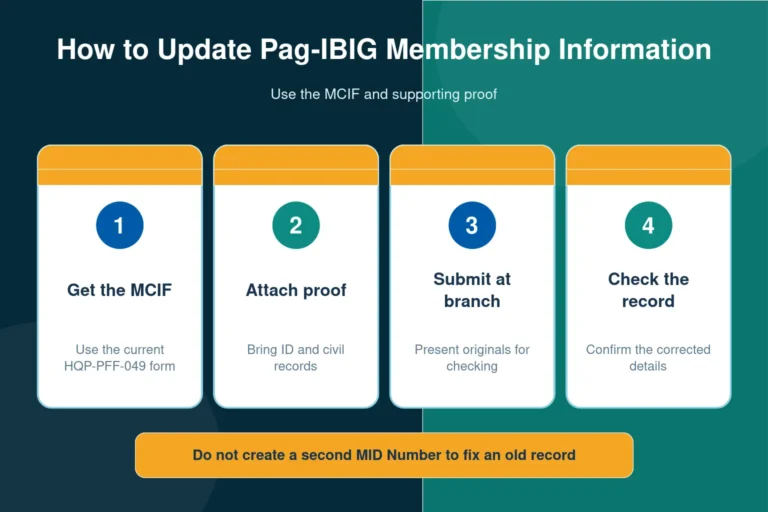
MCIF for updating eligible member details. Form code HQP-PFF-049. See the requirements and update steps.
Multi-Purpose Loan
MPL application for eligible members. Current revision: HQP-SLF-065 V10, dated May 2025.
Housing Loan
Main housing loan application for the principal borrower. Form code HQP-HLF-068.

A blank MDF is not always the MDF your employer wants
The phrase “Pag-IBIG MDF form download” can refer to two different things. The official blank MDF PDF is the form used to provide membership information. An employer, however, may ask for a member record or printed MDF that already shows your registered details and MID Number.
Downloading and completing a blank form does not create an official posted membership record by itself. Members who need a copy connected to an existing account should read our Pag-IBIG Member’s Data Form article before submitting anything to an employer.
Pag-IBIG downloadable forms with direct PDF links
The tables below group commonly searched forms by purpose. The direct links open files hosted on the official Pag-IBIG Fund domain. A link may open in the browser instead of downloading immediately, depending on your device and browser settings.
Membership, savings, cards, and record forms
| Form | Form code | Main use | Official file |
|---|---|---|---|
| Member’s Data Form | HQP-PFF-039 | Membership registration and personal information | Open PDF |
| Member’s Change of Information Form | HQP-PFF-049 | Updating eligible member information with supporting documents | Open PDF |
| Request for Consolidation or Merging of Member’s Records | HQP-PFF-093 V07, 04/2025 |
Requesting the consolidation of duplicate or separate membership records | Open PDF |
| Loyalty Card Plus Application Form | HQP-PFF-108 | Card application through supported branch or enrollment arrangements | Open PDF |
| Modified Pag-IBIG II Enrollment Form | HQP-PFF-226 | MP2 enrollment for eligible members | Open PDF |
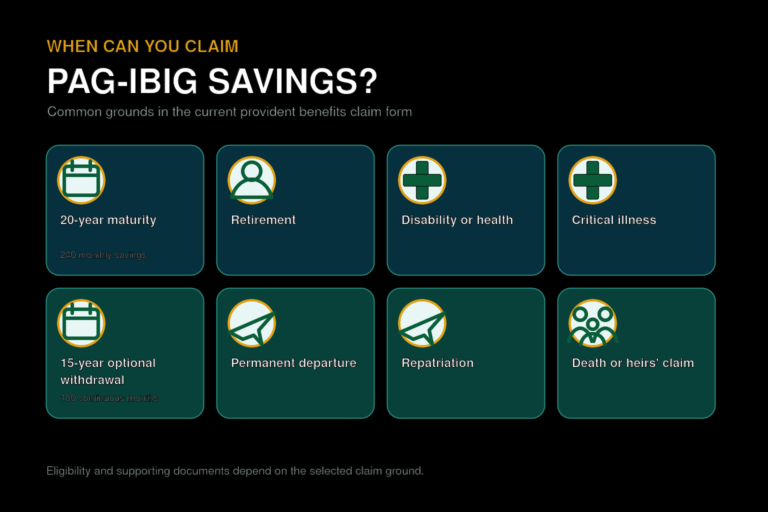
| Application for Provident Benefits Claim | HQP-PFF-285 | Regular Savings or MP2 claim under an applicable claim ground | Open PDF |
| Special Power of Attorney for STL or Provident Claim | HQP-PFF-033 | Authorizing a representative for specified loan or claim actions | Open PDF |
Short-term loan and claim forms
| Form | Form code | Main use | Official file |
|---|---|---|---|
| Multi-Purpose Loan Application Form | HQP-SLF-065 V10, 05/2025 |
MPL application for eligible Pag-IBIG members | Open PDF |
| Calamity Loan Application Form | HQP-SLF-066 V11, 05/2025 |
Calamity loan application during an eligible declared calamity period | Open PDF |
| Short-Term Loan Checklist of Requirements | HQP-SLF-005 V10, 09/2024 |
Supporting-document checklist for MPL and calamity loan filing | Open checklist |
| Provident Benefits Claim Checklist | HQP-PFF-377 | Documents required for different claim grounds and representative filing | Open checklist |
The search phrase “Pag-IBIG salary loan form” usually refers to the Multi-Purpose Loan Application Form. Pag-IBIG commonly calls the product a Multi-Purpose Loan rather than a salary loan. Read the full Pag-IBIG Multi-Purpose Loan article for eligibility and filing details.

Housing-related downloadable forms
| Form | Form code | Main use | Official file |
|---|---|---|---|
| Housing Loan Application | HQP-HLF-068 | Main application for the principal borrower | Open PDF |
| Housing Loan Application for Co-Borrower | HQP-HLF-069 | Additional application for a co-borrower | Open PDF |
| Special Power of Attorney for Accommodation Mortgagors | HQP-HLF-275 | Authorizing specified housing-loan mortgage actions involving an accommodation mortgagor | Open PDF |
| Housing Loan Requirements under Regular Developer | HQP-HLF-738 | Document checklist for a regular developer-assisted application | Open checklist |
Housing applications can require more than one form and a separate checklist based on the property, borrower, developer, or loan purpose. Use our Pag-IBIG housing loan requirements page to identify the documents before printing several forms.
Employer and remittance forms
| Form or file | Form code | Main use | Official file |
|---|---|---|---|
| Employer’s Data Form | HQP-PFF-002 V10, 04/2025 |
Employer registration and business information | Open PDF |
| eSRS Employer Enrollment Form | HQP-TMF-190 | Enrollment of an employer and authorized user in eSRS | Open PDF |
| MCRF Encoding Instructions | MCRF support file | Instructions for completing the employer remittance spreadsheet | Open instructions |
For the full employer process, use the separate pages for Pag-IBIG employer registration and Pag-IBIG eSRS.
How to download and prepare a Pag-IBIG form
Open the official file
Confirm that the link uses the Pag-IBIG Fund domain and that the document title matches your transaction.
Check the form code
Look for the HQP form code and revision information printed on the PDF.
Read printing instructions
Some forms must be printed back to back on a single sheet. Do not ignore the first-page instructions.
Complete and attach documents
Use block letters when requested, sign in the required places, and prepare the supporting documents.
What “Pag-IBIG loan form 2026 PDF” really means
Pag-IBIG forms are controlled by a form code and revision version, not simply by the year typed into Google. A PDF can remain the current official form even when its printed revision date is from an earlier year. The safest approach is to use the current file linked from Pag-IBIG Fund rather than a third-party file labelled “2026.”
Check the file again shortly before submission when you downloaded it weeks or months earlier. A new revision may change the instructions, disbursement options, employer certification, required attachments, or form layout.

Common reasons a form is returned or delayed
Old or incorrect form
The member downloaded a copy from a third-party website or used a form intended for a different transaction.
Missing mandatory entries
Required boxes were left blank instead of being completed according to the instructions.
Wrong printing format
A back-to-back form was printed as separate sheets or part of the form was cut off by incorrect scaling.
Information does not match
The name, birth details, signature, MID Number, or supporting ID differs from the existing member record.
Downloading a form is only the first step. Acceptance depends on the form being correct, complete, signed, and supported by the documents required for the transaction.
Forms that are often confused with generated records
An eSAV, payment instruction, loan status, account statement, or prefilled member record may be generated by an online system rather than downloaded as a blank PDF. Searching for an “eSAV form download” may therefore lead to the wrong expectation. These records normally come from an account, branch request, employer facility, or completed online transaction.
Similarly, a blank membership form is not proof that contributions have posted, and a blank loan form is not proof of loan approval. Use the form for filing, then keep the official receipt, reference number, email, or system confirmation related to the transaction.
Official form category pages
Direct PDF links can change when Pag-IBIG publishes a new revision. If a PDF does not open, use the official category page and select the form again:
Provident and member forms
Membership, savings, MP2, claims, short-term loans, employer, and related files.
Housing-related forms
Housing loan applications, checklists, agreements, SPAs, and related documents.
Frequently asked questions
Where can I download official Pag-IBIG forms?
Use the Pag-IBIG Fund website’s downloadable-form pages or the official PDF links in this article. Check that the address uses the pagibigfund.gov.ph domain.
Can I download the Pag-IBIG MDF as a PDF?
Yes. The blank Member’s Data Form is available as an official PDF. A prefilled or account-linked MDF may require a different process.
Is the MDF the Pag-IBIG registration form?
The Member’s Data Form is the main blank membership-information form commonly associated with registration.
Which form changes my Pag-IBIG information?
Use the Member’s Change of Information Form, HQP-PFF-049, and submit the supporting documents required for the change.
What is the Pag-IBIG salary loan form?
Most users mean the Multi-Purpose Loan Application Form, HQP-SLF-065. Pag-IBIG normally calls the product a Multi-Purpose Loan.
Can I download the calamity loan form?
Yes. The Calamity Loan Application Form is HQP-SLF-066. Eligibility still depends on the applicable calamity rules and filing period.
Which form is used for MP2 enrollment?
The Modified Pag-IBIG II Enrollment Form is HQP-PFF-226. Online enrollment may also be available through the applicable Pag-IBIG service.
Which form is used to claim Pag-IBIG savings?
Use the Application for Provident Benefits Claim, HQP-PFF-285, together with the documents required for the claim ground.
Is there one Pag-IBIG SPA form for every transaction?
No. The correct Special Power of Attorney depends on the transaction. Provident and short-term loan matters use a different form from certain housing transactions.
Can I complete a Pag-IBIG PDF on my phone?
You may be able to type into some PDFs, but you must still follow the signature, printing, photo, notarization, and submission instructions shown on the form.
Should Pag-IBIG forms be printed back to back?
Some forms specifically require back-to-back printing on one sheet. Read the instructions printed on the PDF before printing.
Can I submit a photocopied form?
Requirements differ by transaction. Some forms allow reproduction, but the submission may still require an original signature and original documents for authentication.
Why does an official PDF show an older revision year?
Forms are identified by their revision version. An older printed revision date can still be current when Pag-IBIG continues to publish that file officially.
What should I do when a PDF link does not open?
Open the official downloadable-forms category page, locate the form by its code, and try again. Browser security or the Pag-IBIG website’s protection can sometimes interrupt a direct link.
Is the MCRF a PDF?
The employer remittance file may be an Excel template, while Pag-IBIG also provides PDF instructions for encoding it. Use the original file format required by the employer system.
Can I use a form downloaded from Facebook or a document-sharing site?
It is safer to use the official Pag-IBIG PDF because third-party copies may be outdated, incomplete, altered, or missing instructions.
Related articles
Final reminder
This form list was reviewed on July 31, 2026. Use the direct PDF links for convenience, but always check the form code, revision information, and instructions before submission. A form may be downloadable while the transaction itself still requires an online account, employer certification, supporting documents, notarization, or an in-person visit.
Disclaimer: This website is an independent informational resource and is not affiliated with Pag-IBIG Fund or the Philippine government. Forms and requirements can change. Use official Pag-IBIG channels for the latest document and transaction-specific confirmation.