Pag-IBIG eSRS
Use the official employer portal to prepare remittance schedules, generate payment instructions, manage employee records, and resolve login or payment problems.
Quick answer
Pag-IBIG eSRS means Electronic Submission of Remittance Schedule. The official portal is intended for employers that need to prepare and submit employee remittance schedules for Regular Pag-IBIG Savings, MP2 Savings, and short-term loan payments. The current public login page describes the service for micro and small enterprises and provides access through an approved username and password.
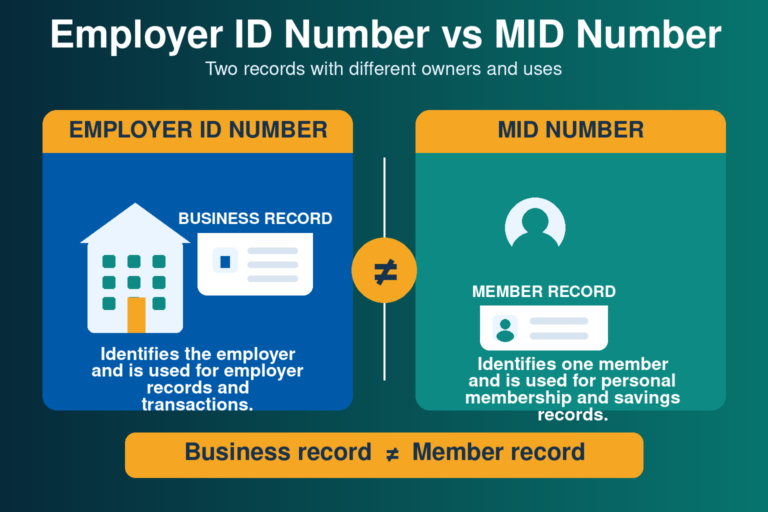
eSRS is not the same as Virtual Pag-IBIG. Virtual Pag-IBIG is mainly a member-facing account, while eSRS is an employer facility. An employer normally needs an active Employer ID Number, an authorized user, accurate employee MID Numbers, and an approved eSRS enrollment before logging in.
What is Pag-IBIG eSRS?
The Electronic Submission of Remittance Schedule is an online service used to organize the employer side of Pag-IBIG remittances. It helps the authorized employer user maintain an employee list, set the amounts that must be remitted, create a payment instruction, and follow the payment record through the available system screens.
The current portal states that micro and small enterprises can use eSRS to create and submit schedules for employees’ Regular and MP2 Savings and short-term loan payments. The facility also links payment preparation with Pag-IBIG collecting partners, which reduces the need to prepare a manual remittance schedule for every transaction.
What employers can do in eSRS
Available labels can change, but the employer workflow normally follows the same sequence from employee records to payment verification.
Manage employee records
Review employees included in the remittance file, confirm MID Numbers, and update employment status or other editable information before creating a schedule.
Prepare amounts
Enter or review the Regular Savings, MP2 Savings, and applicable short-term loan amounts that the employer will remit for the covered period.
Create a payment instruction
Generate the payment instruction or reference needed for the collecting channel, then keep it with the employer’s proof of payment.

Requirements before eSRS enrollment
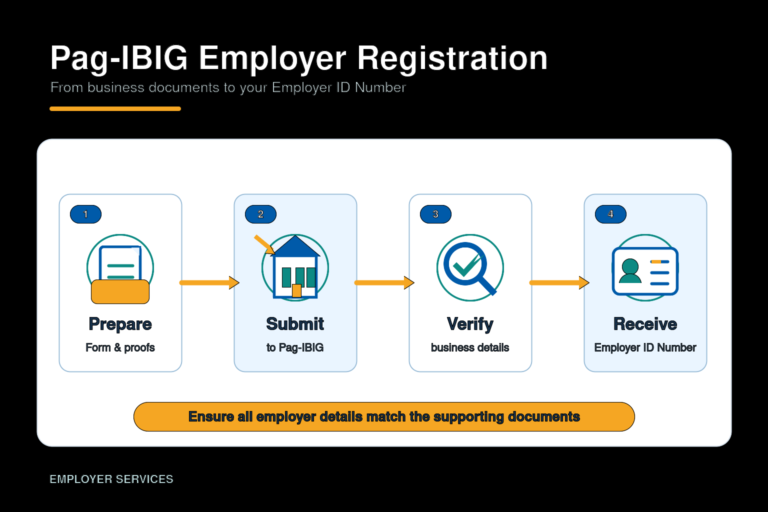
The current official enrollment form is identified as the eSRS Employer Enrollment Form, HQP-TMF-190. It collects the employer’s identifying information, business address and contact details, servicing branch, employer type, and the information of the nominated authorized user.
- Active Pag-IBIG Employer ID Number
- Correct employer or business name
- Pag-IBIG MID Number of the authorized user
- Official company email and contact details
- Current eSRS Employer Enrollment Form
- Signature and authority required by the servicing branch
- Accurate employee MID Numbers for later schedules
- Access to the official employer email inbox

How to enroll in Pag-IBIG eSRS
Download the current enrollment form
Use the official HQP-TMF-190 file rather than a copy from a document-sharing site. Check the revision shown on the official file before completing it.
Complete the employer information
Enter the Employer ID Number, registered business name, employer type, servicing branch, address, telephone details, and official email exactly as recorded with Pag-IBIG.
Nominate an authorized user
Provide the authorized user’s complete name, position, contact details, and Pag-IBIG MID Number. Choose a person who is responsible for payroll or employer compliance and can protect the credentials.
Sign and submit the form
Follow the submission and authentication instructions of the Pag-IBIG branch that maintains the employer account. The branch may request identification or proof that the signatory can act for the employer.
Wait for approval and access details
Pag-IBIG reviews the employer and authorized user information. Approved access details are normally sent through the employer’s registered contact channel. No universal approval time should be assumed.
Change the initial password when required
Use a strong password that meets the current portal rules and store it only in the employer’s controlled password system.
Pag-IBIG eSRS login steps
- Open the official eSRS employer login page.
- Enter the username issued for the authorized employer user.
- Enter the current password carefully.
- Select the login button.
- Complete a required password change if the portal reports that the password has expired.
- Confirm that the employer name and record shown belong to the correct establishment before creating a schedule.
The live portal currently includes a Forgot Password link. It also displays a password-change screen for expired credentials. The current password rules shown on the page require at least one lowercase letter, one capital letter, one number, one symbol, and a minimum of eight characters.
How to use eSRS for a monthly remittance
Review the employee list
Check that every covered employee is listed under the correct MID Number. Update the status of resigned, retired, inactive, or newly included workers using the options available in the account.
Select the correct remittance period
Use the payroll and contribution period that the employer is actually paying. A wrong period can make later reconciliation difficult even when the total amount is correct.
Review each amount
Confirm the Regular Savings, MP2 Savings, MPL, and Calamity Loan amounts that apply. Do not place a loan amount under a savings field or use one employee’s amount for another employee.
Create the payment instruction
Generate the instruction only after the employer totals match the payroll record. Save or print the document and record its payment instruction or reference number.
Pay through the available channel
Use a collecting partner or payment channel accepted for the instruction. Follow the amount and reference exactly as shown rather than using an unrelated payment reference.
Check the transaction record
Return to eSRS and review the available payment or schedule status. Keep the instruction and validated proof until the employer confirms that the remittance is properly reflected.
Where to pay a Pag-IBIG eSRS instruction
Pag-IBIG’s current eSRS login page states that payments can be made through collecting partners, but the partners available to a particular transaction can change. The safest source is the payment instruction generated by the live system and Pag-IBIG’s current official payment-channel information.
Do not assume that every outlet that accepts individual Pag-IBIG payments can also process an employer eSRS instruction. Present or enter the payment instruction number exactly as generated. Before leaving an over-the-counter outlet, confirm that the receipt shows the correct employer reference, amount, and payment date.
eSRS form fields and common mistakes
| Item | What to enter or check | Common mistake |
|---|---|---|
| Employer ID Number | The permanent Pag-IBIG number assigned to the establishment. | Entering an employee MID Number or creating a second employer record. |
| Employer name | The registered business or agency name on the Pag-IBIG record. | Using only a trade name that does not match the registered employer. |
| Servicing branch | The Pag-IBIG branch that maintains the employer account. | Submitting to a different branch without checking account ownership. |
| Authorized user | The person nominated to operate eSRS for the employer. | Using a personal email or nominating someone without the required authority. |
| Authorized user MID | The user’s personal Pag-IBIG MID Number. | Typing the employer number in the member field. |
| Email and contact details | Channels monitored and controlled by the employer. | Using an inactive address, which prevents receipt of notices or password help. |
Employees who do not know their personal number can use the separate Pag-IBIG MID Number instructions. Employers should never guess a MID Number or reuse another employee’s record to complete a schedule.
Forgot password, expired password, and login errors
Forgotten password
Use the Forgot Password option on the official login page. Follow the recovery instructions sent to the employer’s registered contact channel. If the email is no longer accessible, the servicing branch may need to update or verify the authorized user record.
Expired password
The portal may require a password update before continuing. The current page requires lowercase and uppercase letters, a number, a symbol, and at least eight characters. Do not reuse an easy payroll password shared by several staff members.
Invalid username or password
Check capitalization, copied spaces, and whether the user is opening the correct employer portal. Repeated guessing can make account recovery harder, so use the official recovery option instead.
No recovery email received
Check spam and filtered folders, then confirm that the employer still controls the registered email. Contact the servicing Pag-IBIG branch when the address is outdated or the authorized user has changed.

Common eSRS problems and corrective actions
| Problem | Likely check | What to do |
|---|---|---|
| Employee is missing | Employee list and membership record | Confirm the worker’s MID Number and use the available employee-management option. Ask the branch when the record cannot be added. |
| MID Number is rejected | Name, birth details, and MID accuracy | Verify the employee’s permanent MID Number instead of using an RTN or another person’s number. |
| Wrong contribution amount | Payroll calculation and selected field | Correct the schedule before creating the payment instruction. Review the separate Pag-IBIG contribution information for member-rate context. |
| Payment instruction is wrong | Period, employee list, and total | Do not pay an instruction known to be incorrect. Follow the portal or branch procedure for cancellation or correction. |
| Payment status is not shown | Reference number, proof, and transaction date | Allow normal processing, keep the receipt, and ask Pag-IBIG to trace the payment. Do not assume an exact posting time unless Pag-IBIG confirms it. |
| Authorized user left the company | Employer access authority | Stop using the former user’s credentials and coordinate with the servicing branch to update the authorized user. |
| Portal will not load | Official URL, browser, and connection | Retry through the official link, use a current browser, and preserve a screenshot of the error for branch support. |
Security and record-keeping reminders
- Open only the official Pag-IBIG eSRS domain
- Do not share usernames, passwords, or recovery links
- Use an employer-controlled email address
- Remove access when an authorized user leaves
- Save each payment instruction and validated receipt
- Keep a payroll copy of the employee schedule
- Review employee MID Numbers before every submission
- Do not pay the same instruction twice
Employer remittance files contain personal and payroll-related information. Access should be limited to staff whose work requires it. A third-party bookkeeper or payroll provider should use authority approved by the employer and Pag-IBIG rather than informal sharing of the main credentials.
Official eSRS resources
eSRS employer login
Access the current username, password, Forgot Password, and expired-password screens.
eSRS Employer Enrollment Form
Download the current official HQP-TMF-190 form and verify the revision before use.
Pag-IBIG branches
Find branch help for employer enrollment, account verification, authorized-user changes, and transaction tracing.
Operating hours
Check general branch, mall, and hotline schedule information before visiting or calling.
Frequently asked questions
What does Pag-IBIG eSRS mean?
eSRS means Electronic Submission of Remittance Schedule. It is an employer facility for preparing and submitting schedules for employee Pag-IBIG savings and applicable short-term loan payments.
What is the official Pag-IBIG eSRS login page?
The official employer login is hosted at the Pag-IBIG Fund services eSRS address. Use the direct official link provided in this article and check the domain before entering credentials.
Can I use my Virtual Pag-IBIG login for eSRS?
No. eSRS uses employer access issued to an approved authorized user. Virtual Pag-IBIG is a separate member-facing account.
Who can use Pag-IBIG eSRS?
The current portal describes the facility for micro and small enterprises. An employer should confirm with its servicing branch whether eSRS or another accredited electronic remittance facility is appropriate for its account.
What do I need to enroll in eSRS?
Prepare the Employer ID Number, registered employer information, the authorized user’s MID Number and contact details, an official employer email, and the current eSRS Employer Enrollment Form.
Where can I download the eSRS Employer Enrollment Form?
Download HQP-TMF-190 from the official Pag-IBIG Fund website. Check the revision number because older copies may remain available on third-party document sites.
How do I register for Pag-IBIG eSRS?
Complete the current enrollment form, nominate an authorized user, and follow the submission and validation instructions of the branch maintaining the employer account. Pag-IBIG provides access after approval.
How do I reset an eSRS password?
Use the Forgot Password link on the official login page. When the registered email or authorized user is outdated, coordinate with the servicing branch instead of creating another employer account.
What are the current eSRS password rules?
The live portal currently requires at least one lowercase letter, one uppercase letter, one number, one symbol, and a minimum of eight characters when changing an expired password.
Can eSRS include Pag-IBIG MP2 Savings?
Yes. The current portal states that employers can prepare remittance schedules covering employees’ Regular and MP2 Savings, together with short-term loan payments.
Where can an employer pay an eSRS instruction?
Use the collecting partner or channel accepted for the payment instruction generated by the current system. Available partners can change, so the live instruction and official Pag-IBIG information should control.
What is the payment instruction number?
It is the reference connected to the payment instruction created from the employer’s remittance schedule. Keep it with the receipt so Pag-IBIG can trace the transaction if needed.
What should I do if an employee is not listed?
Confirm the employee’s correct MID Number and use the available employee-management function. Ask the servicing branch when the record cannot be added or validated.
What if I entered the wrong remittance amount?
Correct the schedule before payment whenever possible. Do not pay a payment instruction known to contain the wrong period, employee, or amount.
Why is my eSRS payment status not updated?
Check the payment reference, receipt, and transaction details. Do not pay again without verification. Ask the servicing branch to trace the transaction when the status remains unresolved.
Can two staff members share one eSRS password?
Credentials should be limited to approved users and protected by the employer. Informal password sharing weakens accountability and creates risk when a staff member leaves.
Related Employer Services articles
Independent information notice
This website is an independent informational resource and is not operated by, affiliated with, or endorsed by Pag-IBIG Fund or any Philippine government agency. eSRS screens, enrollment requirements, payment channels, form revisions, and branch procedures can change. Use the official Pag-IBIG eSRS portal, official forms, and the servicing branch for current employer-specific confirmation.
Individual members should not use employer remittance routes. See the separate Pag-IBIG online payment page for personal savings and loan payments.