Pag-IBIG Employer ID Number
Understand what the employer number identifies, how a registered employer receives it, where to look for it, and how to recover a missing number without creating a duplicate record.
Quick answer
A Pag-IBIG Employer ID Number identifies a registered employer in Home Development Mutual Fund records. It is used when the employer reports covered workers, prepares contribution transactions, enrolls in employer services, or updates the employer account.
A new employer receives the number after its employer registration is created through the applicable business-registration route or Pag-IBIG branch. An existing employer that has lost the number should retrieve or verify the old record instead of registering again.
What is a Pag-IBIG Employer ID Number?
The Employer ID Number is the reference attached to the establishment’s Pag-IBIG record. HDMF is the legal name of Pag-IBIG Fund, so searches for an “HDMF employer ID” usually refer to the same employer identifier. Some employers informally call it an EIN or employer number, but the business should copy the exact label and number shown in its Pag-IBIG confirmation or account record.
The number does not identify the owner, payroll officer, or employee personally. A corporation, partnership, sole proprietorship, cooperative, government office, or other covered establishment uses its employer record for employer-side transactions.

Employer ID Number vs MID Number
| Identifier | Who it identifies | Typical use |
|---|---|---|
| Employer ID Number | The registered employer or establishment | Employer reporting, contribution work, employer service access, and account updates |
| MID Number | An individual Pag-IBIG member | Personal membership, savings, loans, benefits, and member account inquiries |
An employer should not enter its Employer ID Number where an employee MID Number is requested. The reverse is also incorrect. Employees who need their personal identifier can use the separate Pag-IBIG MID Number instructions.
How to get a Pag-IBIG Employer ID Number
There is no separate shortcut that creates only an employer number. The number is assigned as part of establishing the employer record.
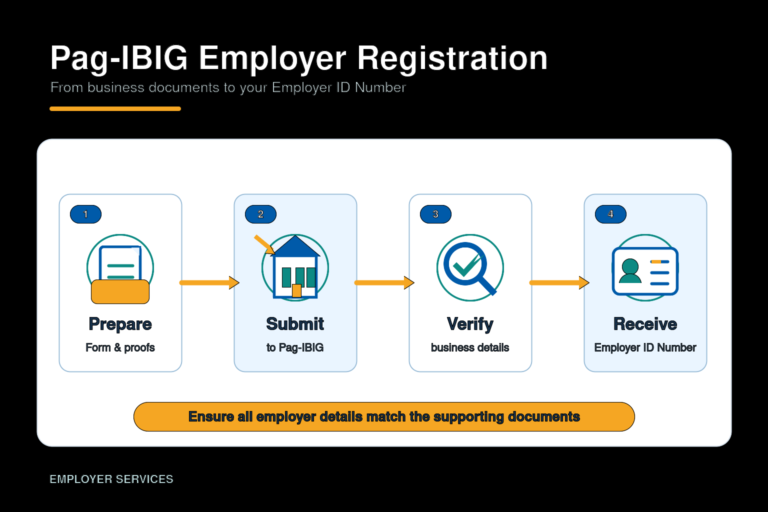
Complete employer registration
Prepare the current Employer’s Data Form and the business documents required for the employer’s legal personality. The full checklist is covered in the Pag-IBIG employer registration process.
Use the applicable registration route
New businesses may proceed through the integrated DTI, SEC, or Philippine Business Hub flow when available. Other employers and account-specific cases may need the servicing Pag-IBIG branch.
Wait for record confirmation
Review the confirmation, employer registration result, or branch-issued record. Save the Employer ID Number together with the establishment’s permanent compliance files.
Set up employer transactions
Use the confirmed employer record for employee reporting, contribution preparation, and the employer online services that apply to the business.
Where the Employer ID Number is used
Employee reporting
It connects employee submissions to the correct employer record.
Contribution work
It helps identify the employer in remittance and reconciliation activities.
Employer services
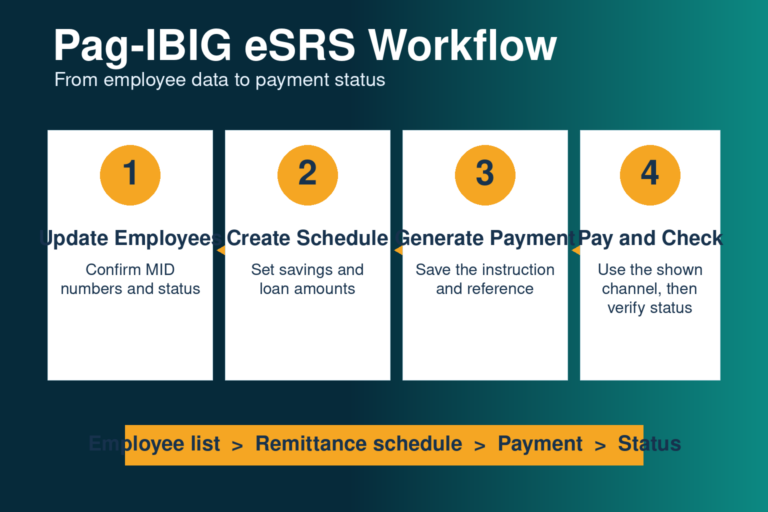
It may be required when setting up or using employer facilities such as Pag-IBIG eSRS.
Record updates
It helps Pag-IBIG locate the establishment when details need correction or updating.

How to find or recover a missing Employer ID Number
Start with the employer’s own records. Check business-registration confirmations, Pag-IBIG notices, previous employer forms, eSRS setup records, payment documentation, and files kept by accounting, HR, or payroll. The number may already exist even when current staff cannot locate it.
If the business registered through SEC or the Philippine Business Hub, review the confirmation email and application dashboard associated with that registration. When the number still cannot be found, contact the servicing Pag-IBIG branch and prepare proof of the employer’s legal identity and the representative’s authority.

Employer ID recovery and record-correction scenarios
Use the existing employer record whenever the same legal establishment is continuing. The right action depends on whether the problem is a missing number, rejected entry, duplicate account, ordinary business update, or a genuine change in legal identity.
The number is missing, but old payments exist
Collect previous remittance receipts, eSRS records, registration emails, Pag-IBIG notices, payroll files, and any document showing the employer name used at the time. Ask Pag-IBIG to retrieve the existing account before submitting another registration.
The number is rejected by eSRS or another form
Check the digits, spaces, employer name, branch or establishment record, and whether an employee MID Number was entered by mistake. A rejected entry does not automatically mean the employer has no account.
Two possible employer records appear
Stop using both references interchangeably. Prepare documents and transaction history for each number, then ask the servicing branch to identify the active record and explain how the duplicate or conflicting record should be handled.
The registered business name or address changed
An ordinary name, address, contact, or authorized-representative update should normally be handled as an update to the existing record, supported by the applicable DTI, SEC, CDA, BIR, government, or authorization documents requested by Pag-IBIG.
The legal personality or ownership changed
A sole proprietorship becoming a corporation, a merger, dissolution, succession, or another legal-identity change may require a different treatment from a simple name update. Confirm whether Pag-IBIG will update the old record, close it, or require a new employer registration.
The business has been inactive for years
Do not assume the old number expired or can be replaced automatically. Bring the old registration and payment evidence, current business documents, representative authority, and valid identification so Pag-IBIG can check whether the record should be reactivated, updated, closed, or replaced.
Can you search another company’s Employer ID Number?
Pag-IBIG does not provide a public company-name lookup for employer numbers. An employee who needs the employer reference for a legitimate form should ask the employer’s HR, payroll, or authorized representative. A business should not publish its employer number casually or provide it to an unknown requester.
Company-specific searches, including searches for a large employer’s Pag-IBIG number, should not be answered using unverified numbers found in posts, screenshots, or comments. Use an authorized company source or ask Pag-IBIG for account-specific assistance.
Common Employer ID problems
The number is rejected
- Check for missing or extra digits.
- Remove spaces only when the system instructs you to.
- Confirm that a MID Number was not entered by mistake.
- Verify the correct branch or establishment record.
- Check whether an old employer name remains in Pag-IBIG records.
The employer details do not match
- Compare Pag-IBIG details with SEC, DTI, CDA, BIR, or government records.
- Separate an ordinary business update from a legal-personality change.
- Use the existing employer record when Pag-IBIG confirms it remains valid.
- Bring proof of authority for the requesting representative.
Former staff controlled the account
- Do not request passwords or one-time PINs from a former employee.
- Prepare new representative authority and current contact details.
- Ask Pag-IBIG how to replace the authorized user or recover access.
- Preserve old receipts and registration evidence for verification.
Several branches or establishments are involved
- Identify the legal employer behind each branch.
- Do not assume every location uses one interchangeable number.
- Match receipts and employee lists to the correct employer record.
- Confirm account structure with Pag-IBIG before consolidating files.
Official verification and support routes
Employer’s Data Form
Use HQP-PFF-002 V10, dated April 2025, when establishing a new employer record.
Philippine Business Hub
Review the integrated registration services currently offered to eligible new businesses.
Official branch locator
Find the Pag-IBIG office that can check an existing employer record or receive supporting documents.
8-PAG-IBIG support
Call (02) 8-724-4244 or use the official contact page to ask which office and documents apply to the record problem.
Frequently asked questions
What is a Pag-IBIG Employer ID Number?
It is the identifier attached to a registered employer’s Pag-IBIG record. The employer uses it for employer-side reporting, contribution work, services, and record maintenance.
Is an HDMF employer ID the same thing?
HDMF is the legal name of Pag-IBIG Fund. A search for an HDMF employer ID usually refers to the Pag-IBIG Employer ID Number.
Is the Employer ID Number the same as a MID Number?
No. The Employer ID Number identifies the establishment, while the MID Number identifies one individual member.
How do I get an Employer ID Number?
Complete the applicable Pag-IBIG employer registration process. The number is assigned when the employer record is created and confirmed.
Is there a separate Employer ID Number form?
The Employer’s Data Form is used to register the employer. There is no public self-service form that generates an employer number without creating or verifying the employer record.
Can I get the number through the Philippine Business Hub?
Some new businesses can receive social-agency employer registrations through integrated business-registration services. Availability depends on the business type and the options currently shown in the system.
Where can I find an existing employer number?
Check registration confirmations, Pag-IBIG notices, previous forms, eSRS records, payment files, and the employer’s HR, payroll, or accounting records.
What if the employer number is lost?
Ask the servicing Pag-IBIG branch to retrieve or verify the existing employer record. Bring business proof and authorization documents when requested.
Should I register again if I cannot find it?
No. First ask Pag-IBIG to confirm whether an employer record already exists. Repeated registration can create duplicate records.
Does the Employer ID Number show the contribution date?
No. The number identifies the employer account. Contribution periods, due dates, and posting dates are separate transaction details.
Can an employee search the employer number online?
There is no public company-name lookup intended for this purpose. Employees should ask their authorized HR or payroll contact when the number is legitimately required.
Can one employer use an employee MID Number?
No. Employer and member identifiers have different owners and uses. Entering the wrong type can cause record-matching or transaction errors.
What if the business name changed?
Update the existing employer record and provide the legal documents requested by Pag-IBIG. Do not create a new account for a simple name change, but confirm separately when ownership or legal personality also changed.
What if the Employer ID Number is rejected?
Check the number, employer name, establishment record, and whether a MID Number was entered by mistake. If the details still fail, ask Pag-IBIG to verify the existing employer record instead of registering again.
What should we do if two employer records appear?
Do not use both numbers interchangeably. Gather the registration and payment history for each record and ask the servicing branch to identify the valid account and the proper treatment of the duplicate or conflicting record.
Does a business name change require a new Employer ID Number?
A name change alone should not automatically be treated as a new employer. Update the existing record with the supporting legal documents requested by Pag-IBIG. A change in legal personality may require different handling.
What if the business changed ownership or legal personality?
Confirm the case with Pag-IBIG. A sole proprietorship becoming a corporation, merger, dissolution, succession, or similar legal change may require the old record to be updated, closed, or replaced with a new registration.
Can an old inactive employer account be recovered?
It may still exist in Pag-IBIG records. Bring old confirmations or receipts, current business documents, representative authority, and valid identification so Pag-IBIG can determine whether the record should be reactivated, updated, closed, or replaced.
Related Pag-IBIG information
Independent information notice
This website is an independent informational resource and is not operated by, affiliated with, or endorsed by Pag-IBIG Fund or any Philippine government agency. This employer-ID guide was reviewed on July 31, 2026. Employer records, integrated registration routes, forms, and verification requirements can change. Use official Pag-IBIG and Philippine Business Hub channels for current or account-specific confirmation.