Pag-IBIG Employer Registration
Learn who must register, which form and business documents to prepare, where employers register in 2026, and what to do after receiving a Pag-IBIG Employer ID Number.
Quick answer
Pag-IBIG employer registration creates the employer record used to report covered workers, access employer services, and remit required savings. The employer normally prepares the latest Employer’s Data Form, proof that the business or government office legally exists, and the valid ID of the authorized signatory.
The correct registration route depends on how the business was organized. Newly registered companies can receive government employer numbers through SEC eSPARC and the Philippine Business Hub. Sole proprietors should review the DTI and Philippine Business Hub flow available to them. Existing establishments that still need an Employer ID Number, need corrections, or cannot complete an integrated route should coordinate with the servicing Pag-IBIG branch.
What Pag-IBIG employer registration means
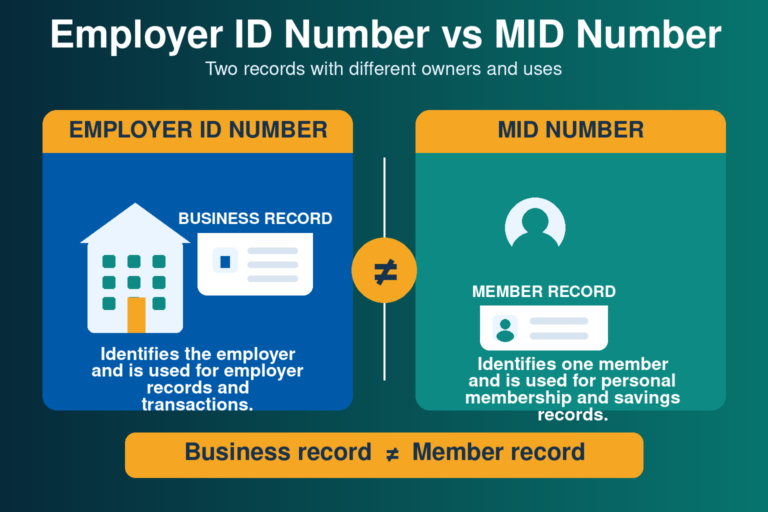
An employer record is different from an employee’s personal Pag-IBIG membership. The employer receives its own Employer ID Number, while each employee uses a separate Pag-IBIG MID Number. These identifiers should never be exchanged on forms, contribution files, or payment references.
Employer registration is the starting point for reporting covered employees and handling the employer side of mandatory Pag-IBIG savings. It also supports later enrollment in online employer facilities, employee record submission, remittance preparation, and account maintenance.
Who needs to register as a Pag-IBIG employer?
Mandatory coverage under the Home Development Mutual Fund Law generally follows employees and employers covered by the SSS or GSIS systems. The employer should register once it becomes responsible for covered workers.
Private employers
Companies, partnerships, sole proprietorships, cooperatives, associations, and other private establishments with covered employees generally need a Pag-IBIG employer record.
Government offices
National and local government offices, constitutional bodies, government-owned or controlled corporations, and other covered public employers use the employer-registration process applicable to their establishment.
Household employers
Household employers may be covered through the unified household registration and reporting system. Use the current form and channel provided for household employment rather than assuming the ordinary business checklist applies.
Where to register a Pag-IBIG employer in 2026
There is no single public page that should be used for every employer. The safest route is the one connected to the legal registration of the business and its present status.
| Employer situation | Current starting route | When branch help is useful |
|---|---|---|
| New corporation or partnership | Register the entity through SEC eSPARC. After successful company registration, the Philippine Business Hub can process government employer numbers, including Pag-IBIG. | Use the servicing branch when the Employer ID is missing, the integrated record did not complete, or the company needs account-specific correction. |
| New sole proprietorship | Complete the DTI business-name process and review the Philippine Business Hub or linked registration options presented for the business. | Ask the Pag-IBIG branch to confirm the employer record when no Employer ID was produced or the online business flow does not cover the situation. |
| Cooperative or association | Prepare the CDA or SEC establishment documents and use the applicable integrated service when available. | The branch can confirm the exact checklist and create or correct the employer record when integration is unavailable. |
| Government employer | Prepare the document showing the office or entity’s creation and authority to operate. | Submit through the servicing Pag-IBIG branch or the official employer channel assigned to the agency. |
| Existing employer | Do not create a duplicate record simply because the old number is missing. | Request retrieval, verification, correction, or branch-specific registration support from Pag-IBIG. |

Pag-IBIG employer registration requirements
The Employer’s Data Form and proof of legal existence are the core requirements. The exact supporting document depends on the employer’s legal personality.
| Employer type | Business proof normally prepared | Important preparation note |
|---|---|---|
| All employers | Latest Employer’s Data Form, HQP-PFF-002, plus a readable photocopy of the valid ID of the authorized signatory. | Complete the form accurately and present original or certified records when authentication is required. |
| Sole proprietorship | DTI Certificate of Business Name Registration. | The registered business name and owner details should match the Employer’s Data Form. |
| Partnership or corporation | SEC Certificate of Partnership or Incorporation, approved Articles of Partnership or Incorporation, and By-Laws when applicable. | Use certified true copies when required and make sure the principal office and company name match. |
| Foreign-owned corporation | SEC registration and the approved organizational documents applicable to the Philippine entity. | Prepare the local authorized representative and address information requested in the form. |
| Cooperative | CDA Certificate of Registration and approved Articles of Cooperation. | Use the cooperative’s registered name and authorized signatory details. |
| Trade association or non-stock entity | SEC Certificate of Incorporation and approved Articles and By-Laws. | Confirm whether any additional proof of current authority is requested by the branch. |
| Government office or entity | Law, charter, executive issuance, ordinance, or other document establishing the office or entity. | The branch may request the authority of the signatory or payroll representative. |

How to download and complete the Employer’s Data Form
Business and registration details
- Registered employer or business name
- Trade name when applicable
- Business address and contact information
- Legal personality and industry classification
- DTI, SEC, CDA, or establishment registration details
- TIN and other government employer references requested
Authority and employer structure
- Head office, branch, or project status
- Date business operation or employment started
- Name and position of the authorized signatory
- Authorized contact and official email address
- Certification, signature, and date
- Other fields that apply to the legal personality
Use the exact information shown on the official business documents. Small differences in punctuation are not always important, but a different owner name, corporation name, address, registration number, or legal personality can stop the record from matching. Do not enter an employee’s MID Number in a field intended for the employer.
If a section does not apply, follow the instructions printed on the current form. Do not erase or alter certification language. When another person prepares the documents, the employer should still review every field before the authorized signatory signs.
How to register as a Pag-IBIG employer
Identify the legal personality
Confirm whether the employer is a sole proprietorship, partnership, corporation, cooperative, association, government office, or another establishment type. This determines the supporting document and registration route.
Check whether an employer record already exists
A business registered through an integrated government service may already have an Employer ID Number. Search internal records and ask the branch before creating a duplicate employer account.
Download the current Employer’s Data Form
Use the latest HQP-PFF-002 file from Pag-IBIG Fund. Complete the business, registration, address, signatory, and contact details that apply.
Prepare the supporting documents
Make clear copies of the DTI, SEC, CDA, government, or other establishment proof. Include the valid ID and authority documents requested for the signatory.
Submit through the correct route
Use SEC eSPARC and the Philippine Business Hub for a newly registered company when offered, the DTI-linked business route for a sole proprietor when available, or the servicing Pag-IBIG branch.
Respond to verification requests
Pag-IBIG may ask to see originals, certified copies, clearer scans, corrected details, or proof that the signatory can act for the employer.
Receive and protect the Employer ID Number
Save the number in the employer’s permanent compliance records. Share it only with authorized payroll, accounting, HR, or representatives who need it for official work.
Continue with employee and remittance setup
After the record is active, complete employee reporting and enroll in the employer services needed for contributions and online submission.

Is Pag-IBIG employer registration free?
The official Pag-IBIG employer-registration checklist and service description do not list a Pag-IBIG registration fee. A business may still pay separate charges connected to DTI, SEC, CDA, local permits, notarization, certified copies, courier services, or other business-registration requirements.
Do not pay a private person who promises an Employer ID Number without proper business documents. Use only the official integrated business-registration service or a Pag-IBIG branch. Ask for an official receipt whenever a separate government or document-related charge applies.
Common problems that delay employer registration
Business information does not match
- Trade name used instead of registered employer name
- Old address on one document
- Wrong SEC, DTI, CDA, or TIN number
- Incorrect legal personality selected
- Different owner or signatory name formats
Submission is incomplete
- Outdated Employer’s Data Form
- Missing Articles or By-Laws
- Unreadable signatory ID
- No certified copy or original for authentication
- Missing proof of the representative’s authority

What to do when no Employer ID Number arrives
First confirm that the business-registration transaction was completed and that the email address used was correct. Review the confirmation page, email, or reference number from SEC, DTI, or the Philippine Business Hub. If Pag-IBIG employer information is missing, contact or visit the servicing Pag-IBIG branch with the business documents and registration reference.
Do not repeat the integrated registration several times. Duplicate employer records can make employee reporting and remittance reconciliation harder. Ask Pag-IBIG to retrieve or verify the existing record before a new one is created.
What happens after employer registration?
Secure the Employer ID
Store the EIN with the business-registration records and confirm which branch services the employer account.
Report covered employees
Make sure each worker has the correct personal Pag-IBIG record and that employer submissions use accurate employee details.
Set up remittance work
Prepare the employer contribution process, payment controls, and online employer access required for regular compliance.
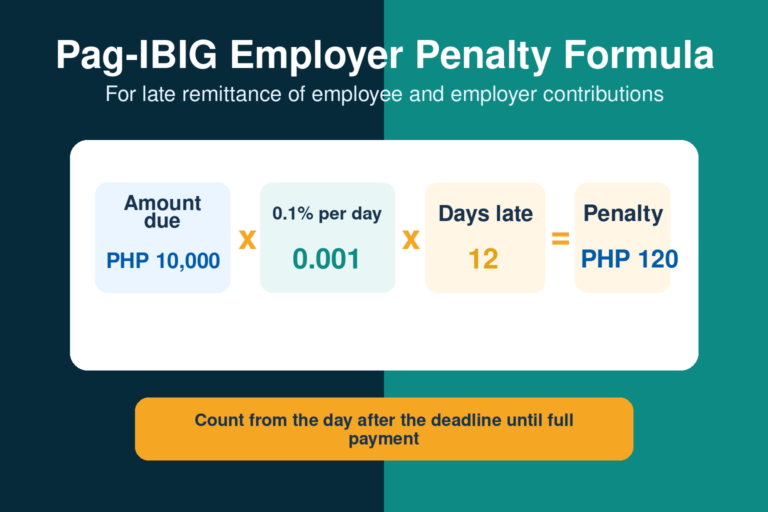
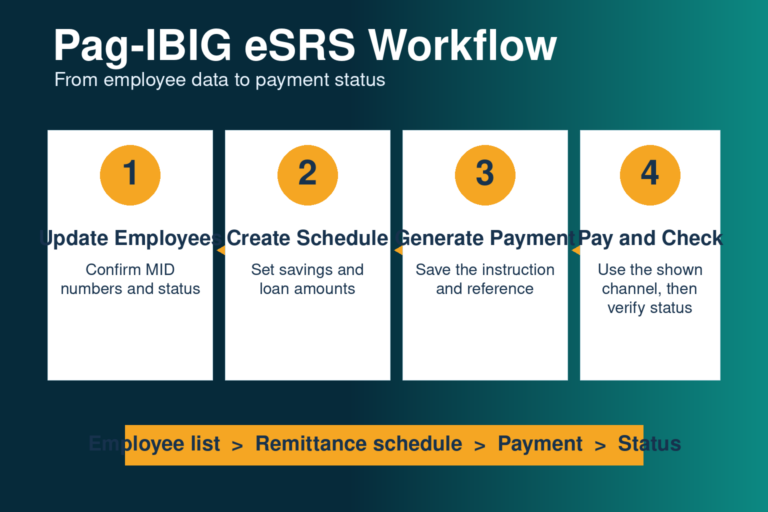
The Pag-IBIG Employer ID Number article explains how to find, recover, and use the employer reference. The Pag-IBIG eSRS instructions explain enrollment, login, employee schedules, payment instructions, and common errors. Future Employer Services pages will cover the employer contribution table and late-remittance penalties in detail. This registration article stays focused on creating the employer record correctly.
Security and record-keeping reminders
- Use official DTI, SEC, Philippine Business Hub, and Pag-IBIG pages
- Keep the Employer ID Number in controlled business records
- Do not share portal passwords or OTP codes with agents
- Save copies of submitted forms and supporting documents
- Keep email and mobile details current
- Record the branch and reference number used
- Limit employer account access to authorized staff
- Update Pag-IBIG after a formal business change
A change in address, business name, legal personality, authorized signatory, or operational status may require an Employer’s Change of Information Form and supporting documents. Do not create a new employer account merely to update an existing establishment.
Official employer registration resources
Employer’s Data Form
Download Employer’s Data Form HQP-PFF-002 V10, revised April 2025, and confirm the revision before filing.
SEC eSPARC
Companies and partnerships can start the SEC company-registration process and proceed to integrated government registrations.
Philippine Business Hub
Review the unified business-registration and government-agency services currently available.
DTI Business Name Registration
Sole proprietors can use DTI’s official business-name registration system and follow the linked business setup process.
Related Pag-IBIG information
Frequently asked questions
Can I register a Pag-IBIG employer entirely online?
Some new businesses can receive Pag-IBIG employer numbers through integrated DTI or SEC registration and the Philippine Business Hub. Existing employers, unsupported legal personalities, missing Employer IDs, and corrections may still require help from a Pag-IBIG branch.
What is the main Pag-IBIG employer registration form?
The main form is the Employer’s Data Form, commonly identified as HQP-PFF-002. Always download the current official version because form revisions and attachment checklists can change.
What are the basic Pag-IBIG employer registration requirements?
Prepare the latest Employer’s Data Form, proof of the business or government entity’s legal existence, and the valid ID of the authorized signatory. Additional organizational or authority documents depend on the employer type.
Does a sole proprietor need an SEC certificate?
No. A sole proprietorship normally uses its DTI Certificate of Business Name Registration. SEC documents apply to corporations, partnerships, and other entities registered with the SEC.
What does a corporation normally submit?
A corporation normally prepares the SEC Certificate of Incorporation, approved Articles of Incorporation, and By-Laws when applicable, together with the Employer’s Data Form and signatory identification.
What does a cooperative normally submit?
A cooperative normally prepares its CDA Certificate of Registration and approved Articles of Cooperation, plus the current Employer’s Data Form and authorized signatory documents.
Is there a Pag-IBIG employer registration fee?
The official Pag-IBIG registration checklist does not list a Pag-IBIG employer-registration fee. Separate fees for business registration, certified copies, permits, notarization, or courier services may still apply.
How long does Pag-IBIG employer registration take?
No single processing period should be promised for every route. Timing depends on document completeness, integrated agency processing, record matching, and whether the branch requests correction or authentication.
Can an authorized representative submit the documents?
An authorized representative may be able to submit or follow up, but Pag-IBIG can require proof of authority, valid identification, and the signature of the authorized employer official. Confirm the branch’s current requirements before sending a representative.
What is a Pag-IBIG Employer ID Number?
It is the identifier assigned to the employer establishment for Pag-IBIG employer records and transactions. It is different from the MID Number assigned to an individual member.
What should I do if the Employer ID Number is missing?
Review the confirmation from the business-registration service and search the employer’s records first. Then ask the servicing Pag-IBIG branch to retrieve or verify the employer record before submitting another registration.
Can I use the employee online registration page for my business?
No. Member online registration creates an individual membership record and MID Number. Employer registration creates the establishment record and Employer ID Number.
Does an employer with only one employee need to register?
An employer should check coverage as soon as it employs a worker subject to mandatory Pag-IBIG coverage. The number of employees should not be used as a reason to ignore an applicable employer obligation.
Why was my registration returned for correction?
Common reasons include mismatched business information, an outdated form, unreadable identification, missing organizational documents, an incorrect legal personality, or no proof that the signatory can act for the employer.
What should the employer do after receiving the EIN?
Secure the number, report covered employees accurately, establish the contribution and remittance process, and enroll in the employer online services needed for regular compliance.
How does an employer update its registered information?
Use the current Employer’s Change of Information Form and the supporting document for the change. Contact the servicing branch for legal-personality changes, mergers, closure, suspension, or other major account updates.
Independent information notice
This website is an independent informational resource and is not operated by, affiliated with, or endorsed by Pag-IBIG Fund or any Philippine government agency. Forms, integrated business-registration routes, documentary requirements, and branch procedures can change. Use official Pag-IBIG, DTI, SEC, CDA, and Philippine Business Hub channels for current and establishment-specific confirmation.
Employer registration and remittance PDFs are listed in our Pag-IBIG downloadable forms directory.